Sooner or later, everyone who works with Kafka asks a topic a question. How many orders came in for this customer? Which records have no match in the other topic? What did this partition receive in the last hour? A message browser shows the records one by one. It does not count them, sum them or match them against anything.
The usual answer is a consumer. You write a small program, point it at the topic, deserialize the records and add them up. Or you run a stream processor such as ksqlDB, on a server or a cluster of its own. There you declare a table over the topic before the first query. Either way, there is work to do before the first answer.
In short
Alginte lets you ask the question in SQL, from the console. There is no second cluster to run. The engine underneath is DuckDB, an analytical database that ships inside the console. There is nothing to install. This post shows three queries on the playground. The first sums a topic. The second joins it with a file, and the third joins two topics. Then it shows what a query is not allowed to do.
One topic, one question
DuckDB queries tables and files. A topic is neither. It has no end, and
its records are bytes that only the right deserializer turns into fields.
So we gave DuckDB a
table function,
kafka_topic(). It goes in FROM, where a table name would. It reads
records from the topic the way the console’s
message viewer
does, with the same deserializers, and hands them to DuckDB as a table.
For example, the playground’s orders topic holds ten Avro orders. Each
one has a customer, an item, a quantity and a price. Which customers spend the most?
SELECT customerId, count(*) AS orders,
       round(sum(quantity * priceEur), 2) AS revenue
FROM kafka_topic('orders', value_format := 'Avro')
GROUP BY ALL
ORDER BY revenue DESC| customerId | orders | revenue |
|---|---|---|
| c-5521 | 1 | 320 |
| c-6650 | 2 | 300.9 |
| c-1001 | 2 | 125 |
| c-3305 | 1 | 119.98 |
| c-8802 | 2 | 76.5 |
| c-2417 | 2 | 56.5 |
In Alginte, a query starts from the topic itself, with Query with SQL in the message viewer. The starter query reads the topic the way the viewer is reading it, with the deserializer chosen there.
The 1-minute clip below walks through it, from the viewer to the query’s answer, and shows what the editor offers on the way.
From the message viewer to the answer. The editor knows the topic’s names, formats and columns.
What comes back depends on the format. Every row carries _partition,
_offset, _timestamp, _key and _value, the whole value. With String,
the default, that is all: the value stays one piece of text in _value.
With JSON, the console also detects columns from the records it reads:
each field becomes a column, typed by the values in it. With Avro, the columns come
from the schema registered for the topic. Protobuf and JSON Schema work the
same way.
Each call reads a range of the topic
Because a topic has no end, each call to kafka_topic() reads a range of
it, by default the last 1,000 records. These arguments change the range:
last :=sets how many of the newest records to read.from_offset :=sets where the range starts, by offset.after :=orbefore :=set it by time.
With an offset or a time, max := caps how many records the call reads. A
range holds at most 100,000 records by default. That is a starting value,
and it can be raised like the other sizes.
The answer covers the range only. When the range does not cover the whole topic, the answer says so, and says how to read it all.
A topic and a CSV file
Not all data lives in Kafka. A price list with cost prices is a
typical case: it lives in a spreadsheet. The playground ships one,
products.csv, with the cost of each item the orders sell. Which category
earns the most? The cluster cannot answer that on its own. The topic has
the prices, and the file has the costs.
SELECT p.category,
       round(sum(o.quantity * (o.priceEur - p.unitCostEur)), 2) AS margin
FROM kafka_topic('orders', value_format := 'Avro') o
JOIN read_csv('/data/products.csv') p USING (item)
GROUP BY ALL
ORDER BY margin DESC| category | margin |
|---|---|
| machines | 231.9 |
| brewing | 149.48 |
| accessories | 66.5 |
read_csv() is DuckDB’s own. It reads only from the one folder the console
allows, described below.
Joining two topics
The playground also holds customer-tiers, a JSON topic with a tier for
each customer. Revenue by tier is one join away:
SELECT c.tier, count(*) AS orders,
       round(sum(o.quantity * o.priceEur), 2) AS revenue
FROM kafka_topic('orders', value_format := 'Avro') o
JOIN kafka_topic('customer-tiers', value_format := 'JSON') c USING (customerId)
GROUP BY ALL
ORDER BY revenue DESC| tier | orders | revenue |
|---|---|---|
| gold | 4 | 425.9 |
| silver | 4 | 133 |
| bronze | 1 | 119.98 |
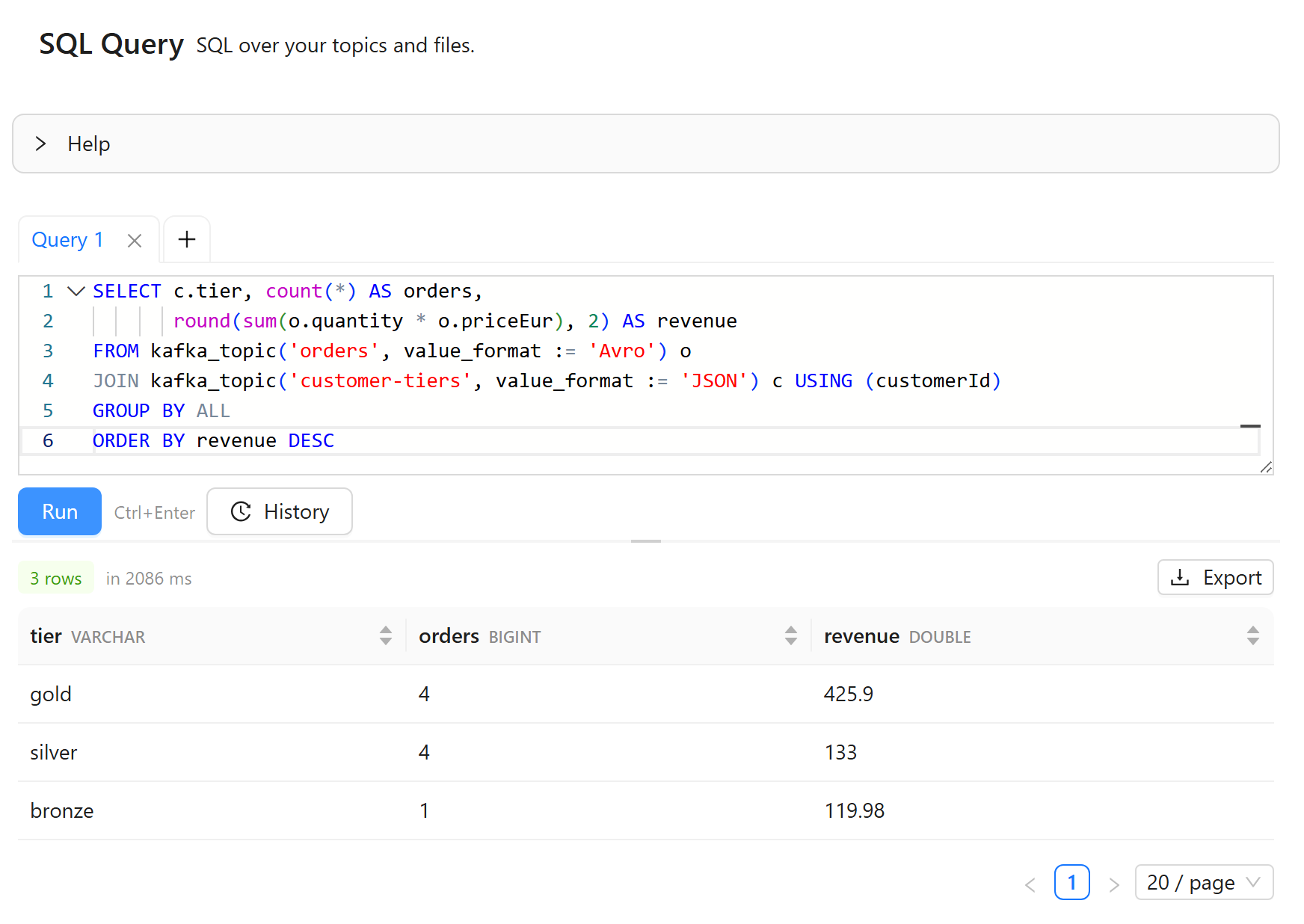
The two topics have different formats. Each call reads its own topic with
its own deserializer. customer-tiers has no schema in the registry, so
its columns come from its records. The topics need not share a key, a
partition count or a format. The join runs on any field, here customerId
from each value.
A join covers the records inside each range, set as shown above. Every
join type DuckDB has works here: inner, left, right, full and cross. In
the example, one customer has no tier in customer-tiers. The query uses
an inner join, so that customer’s order drops out, and the answer counts
nine orders, not ten. A LEFT JOIN would keep it, with no tier.
Locked down by design
A SQL engine inside a console that holds your cluster’s credentials should not be able to write files, reach the network or change its own rules. We set these rules on purpose, and every query runs in memory under them:
- It writes nothing. No file, anywhere. Our tests found that DuckDB always allows its own spill folder, where a large query parks data on disk. So spilling is off by default, and a query cannot write there either.
- No files until you choose a folder. Reading files is off until one
folder is configured. Then files are read from that folder and nowhere
else. A
../path, a wildcard outside it or a symlink that leads out of it is refused. - The folder must be read-only. DuckDB can write inside a folder it is allowed to read. So the console checks the folder when it starts. If it can write there, it runs no SQL at all, and says why.
- No extensions. Installing or loading one is refused, and so is a URL that would load one.
- No changing the rules from SQL. The settings are locked. A
SET,RESETorPRAGMAthat would undo them is refused.
Kafka is the subject of every query. Anything else may only enrich it, and only if it adds no network reach and no stored password. A file in one read-only folder passes that test. It carries the reference data that never travels through Kafka, such as a price list or a country-to-region mapping.
DuckDB can do more than this elsewhere. It can attach a Postgres database or read from object storage and URLs. In the console those stay off, because each needs network reach and a stored password. A query that can reach a remote database can also copy a topic’s records into it. And the console already holds the keys to your cluster, so every extra secret it keeps is one more thing exposed if it is misused. A query sends its records nowhere but back to you.
To join a topic with a table from a database, export the table to a file in the folder. Would you rather join a database directly? Tell us in Discussions: which database, and what you would join with which topic.
Sizes
Each query starts with these sizes, and each one is a setting:
- 256 MB of memory and 30 seconds per query. They keep one heavy query from slowing the console.
- Up to 100,000 records per call. This keeps one call from pulling a whole topic off the cluster.
- Up to 1,000 rows per answer. This keeps the answer readable in a browser.
Where the console has the memory and the cluster has the headroom,
raise them.
A query over its memory fails with DuckDB’s “Out of Memory Error”, and the
console keeps running. Or the query can be allowed to spill. With
alginte.sql.spill=true, each query gets its own temporary folder, deleted
when it ends.
Setting it up
There is nothing to turn on. SQL over topics is on by default. Joining a file needs one more step: a folder, mounted read-only, named in the console’s configuration. In Docker Compose that is two lines:
    environment:
      ALGINTE_SQL_ALLOWEDDIRECTORY: /data
    volumes:
      - ./files:/data:ro
The playground has both, so every query in this post runs there as it is.
The same question, from an agent
The console’s MCP endpoint has a run_sql tool. It runs the same query in
the same locked-down DuckDB. An agent asks its question in one call, and
the console does the counting and the joining. The agent does not pull raw
records into its own context to add them up. A query that fails comes back
with DuckDB’s message, so the agent can fix it and ask again.
A later post in this series connects an agent to the console and follows it through one question. We announce new posts on our social channels, linked in the footer.
How fast
We timed the queries on a laptop (Intel Core Ultra 7, 64 GB), against a local playground, with the console’s defaults. Most of the time goes into reading the topic.
- Revenue by customer over 100,000 Avro records answered in about 1 s. That is the most one call reads by default. Over the playground’s 10 records the same query took about 0.6 s. So most of the time is the fixed cost of a read.
- Partitions cost more than records. The same 100,000 records spread over three partitions took about 2 s, because the read polls each partition in turn.
- The tier join against those 100,000 orders took about 2.5 s. Most of the
extra is
customer-tiers: five records on three partitions, about 1.5 s.
So the time follows the partitions a call reads more than the records in them. The SQL itself takes little of it. DuckDB is built for this kind of work, aggregations and joins over whole tables, with a columnar-vectorized engine.
Recap
kafka_topic()turns a range of a topic into a table, typed the way the message viewer reads it.- Ask the question in SQL: count, sum, group, join.
- Join a topic with a file, or with another topic, in one query.
- A join covers the records inside each range, with any join type.
- It is on by default. A query writes nothing, reads files only from one read-only folder, loads no extension and cannot change its own settings. Its memory, time and sizes start small, and each one is a setting.
- An agent asks the same question through the MCP tool
run_sql.
Related reading
- SQL Query: the guide, with state stores, the editor, the result and every setting.
- MCP tools:
run_sqland the other read-only tools an agent can call. - Friendly SQL:
DuckDB’s additions to SQL,
GROUP BY ALLamong them. - CSV Import: the
options of
read_csv(), for a file of your own.
Updates
- 2026-11-25: when first published, earlier that day, the clip and the tier-join still were recorded before the release. They showed the SQL Query page’s earlier subtitle. Both are now recorded on the released console. The queries and their answers are unchanged.
DuckDB is a trademark of the DuckDB Foundation.