A question about a Kafka system rarely stays in one place. The records are in topics. What the Streams apps have computed is in their state stores. Data from outside the cluster, owned by other systems, arrives as files exported from them. Each is usually read with its own tool: a topic browser, a store inspector, a spreadsheet. In SQL, a question that spans two or more of them is one join, which brings tables from different sources into one answer.
That is why we brought SQL into the console, with
DuckDB as its engine. Our
previous post showed
kafka_topic(), which reads a topic, joined with a file or another topic.
This one adds the third place, the
state store.
With stores in SQL, one query can join an app’s state with topics or external data.
The simple case: an app on the canvas
Alginte runs the Streams apps you build on its canvas in its own process,
where the query runs too. So a second
table function,
kafka_store(), reads their stores out of the box, in SQL, with nothing
added to the app.
The playground deploys
a small app from the canvas, orderCounts. It reads orders, groups them
by customer and counts them. The count node is named orders per customer.
Alginte names the store after the node, with the node’s id added:
orders-per-customer-perCustomer. The editor offers the exact name as you
type, and so does the stream’s
State tab.
SELECT _key AS customerId, _value AS orders
FROM kafka_store('orderCounts', 'orders-per-customer-perCustomer')
ORDER BY orders DESC, customerId| customerId | orders |
|---|---|
| c-1001 | 2 |
| c-2417 | 2 |
| c-6650 | 2 |
| c-8802 | 2 |
| c-3305 | 1 |
| c-5521 | 1 |
The first argument is the app’s id, the second the store’s name. A stream’s State tab opens each of its stores in SQL. The 20-second clip below goes from the store’s health to what it holds.
From the State tab to what the store holds, in one click.
A stream’s State tab already shows how a store is doing: its size, its changelog lag, whether it is restoring. That tells you whether the store is healthy. A count that looks wrong, a key that never arrived, an aggregate that drifted: those need the values. The query gives them, one click from the health numbers.
What comes back
Every row carries _partition, _key and _value. The values come back in
the store’s own types. A count is a number, so sum(_value) needs no cast.
When the values are objects, as in an aggregate, each field also becomes a
column.
A windowed store adds _window_start and _window_end, in UTC. It holds
only the windows within its retention: the window size plus its grace.
Older windows are gone from the store.
Current limitations
A Kafka Streams app can run as several instances. Each holds the store’s
partitions it was given. Our
post on max.poll.interval.ms
explains how Kafka Streams spreads the partitions over them. kafka_store()
reads the partitions this console holds, and only for the apps this console
runs.
A partial answer says so
When the same app also runs somewhere else, the answer says it is partial, for example “1 of 2 partitions”. It can tell only when the store has a changelog, which is the default. Without one, a partial answer carries no warning.
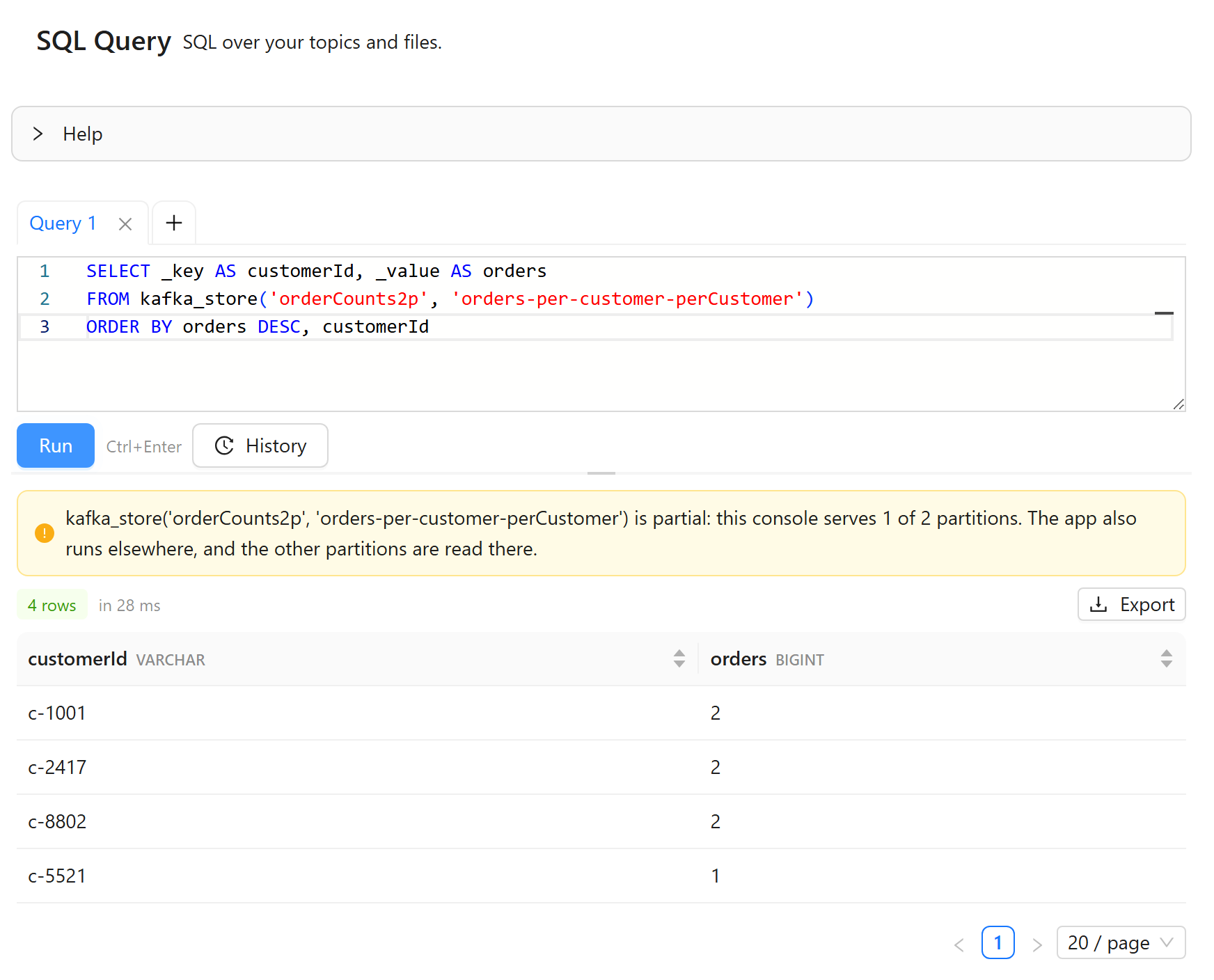
Here the same counting app, deployed as orderCounts2p, runs on two
consoles, and each serves one of the store’s two partitions. This console
holds four of the six customers, and the answer says so above the rows:
The workaround: a store’s changelog topic
For an app deployed anywhere else, the route is its store’s changelog topic,
read with kafka_topic(). By default a store logs its changes to a
changelog topic,
<app>-<store>-changelog.
The route is not ideal. If it were, we would read every store this way, and
kafka_store() would not exist.
The route works for key-value stores only. A windowed store’s changelog key carries the window as bytes, so it does not read as the key. A store with logging off has no changelog at all.
A changelog is the store’s history, so the query has to rebuild what the store already holds. It names the store’s value format, reads from the start, keeps the newest record per key and drops deleted keys. The join below shows that query.
Two apps’ state in one answer
The playground runs a second app, orderRevenue, which sums each
customer’s revenue. Here we read its state through its changelog and join it
with the order counts from the store:
SELECT s._key AS customerId, s._value AS orders, r._value AS revenue
FROM kafka_store('orderCounts', 'orders-per-customer-perCustomer') s
JOIN (SELECT _key, _value
      FROM kafka_topic(
        'orderRevenue-revenue-per-customer-perCustomer-changelog',
        value_format := 'Double', from_offset := 0, max := 100000)
      QUALIFY row_number()
        OVER (PARTITION BY _key ORDER BY _offset DESC) = 1) r
  USING (_key)
WHERE r._value IS NOT NULL
ORDER BY revenue DESC| customerId | orders | revenue |
|---|---|---|
| c-5521 | 1 | 320 |
| c-6650 | 2 | 300.9 |
| c-1001 | 2 | 125 |
| c-3305 | 1 | 119.98 |
| c-8802 | 2 | 76.5 |
| c-2417 | 2 | 56.5 |
Neither app was changed for this answer. The subquery is the changelog
route. The value format is the store’s value serde, Double for this sum.
Read the changelog from its start, so that every key is in the range.
max caps how many records the call reads, and 100,000 is the console’s
limit by default. On a longer changelog the answer warns that it read only
part of the topic. A key’s newest record may then be in the part it missed.
A record with no value is a deleted key.
QUALIFY, a DuckDB clause,
picks each key’s newest record, a deleted one included. The WHERE then
drops the keys whose newest record is a deletion. The order matters.
Dropping the deletions before QUALIFY would bring back the value they
deleted.
Right after the playground starts, the join can answer no rows for up to 30 seconds, until the first commit writes the changelog. Run it again after that.
What we are thinking about
Both limits have known ways around them. Kafka Streams knows which instance holds which part of a store, so a query could ask each instance for its part. An app that runs elsewhere could answer a query itself, if something in the app received it. We have not decided whether or how to build either.
If you need this, we would like to hear what you would ask your stores, and what you use today. Tell us through any channel linked at the foot of www.alginte.com.
Recap
kafka_store('<app>', '<store>')reads a state store of an app this console runs, in SQL, in the store’s own types.- Its limits: it reaches only the apps this console runs, and of those only the partitions this console holds.
- With several instances, the answer says when it is partial.
- An app deployed elsewhere: read its changelog topic with
kafka_topic(), newest record per key. - A store joins with a topic or another app’s changelog like any table.
Related reading
- Adding an RPC layer to your application: how an app exposes its stores to other processes, in Kafka’s interactive queries guide.
- Log Compaction: why a changelog keeps at least the last value for each key, in Kafka’s design docs.
DuckDB is a trademark of the DuckDB Foundation.